
Karaoke software that keeps your show moving. Everything in one place.
Manage your singers, songs, playlists and playback from one clear interface built for smooth live karaoke.
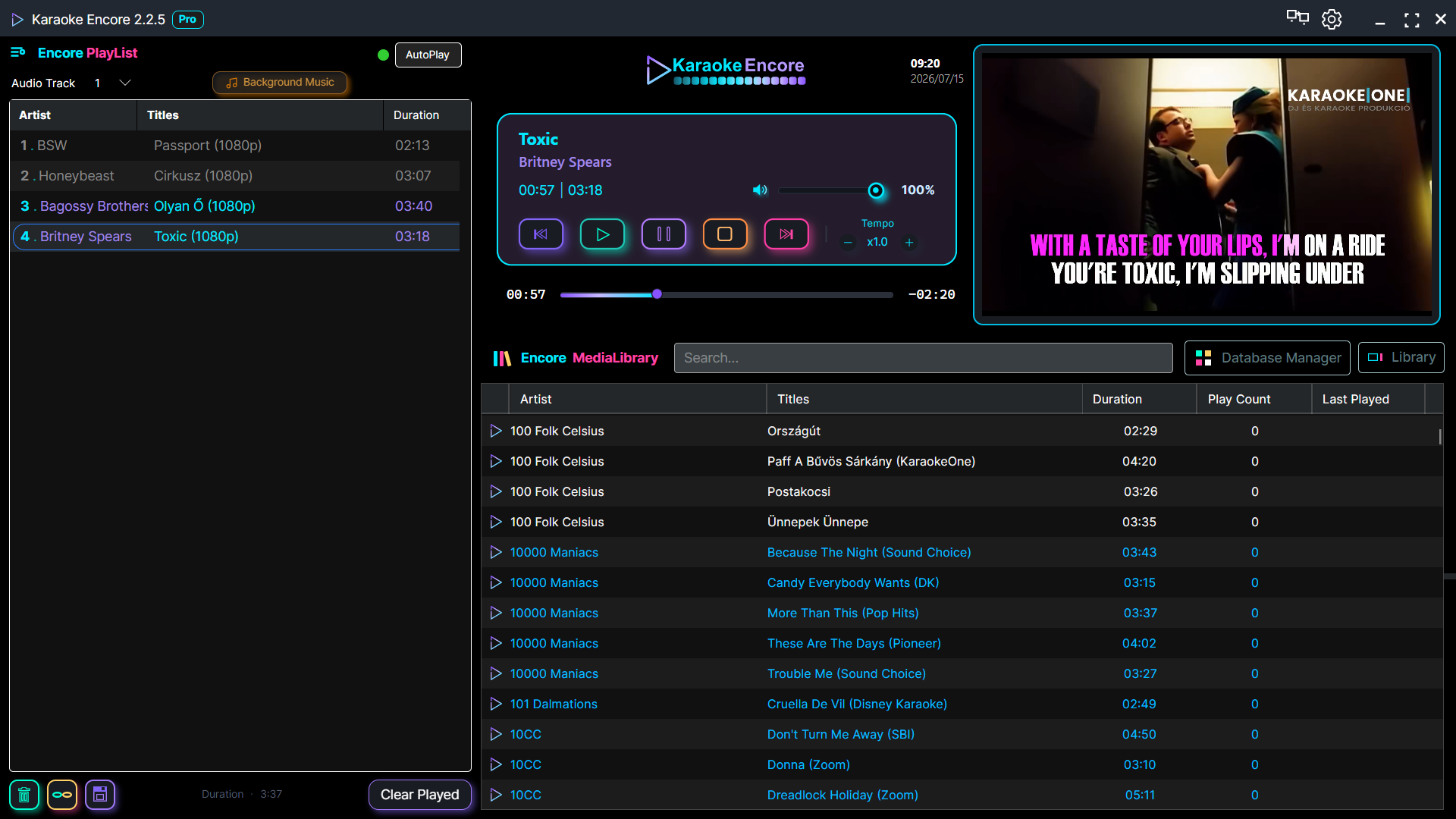
Home vs Pro
| Feature | Home | Pro |
|---|---|---|
| Automatic playlist progression | ✓ | ✓ |
| Save & manage playlists | ✓ | ✓ |
| Tempo adjustment | ✓ | ✓ |
| Encore TagMaster (ID3 tag editor) | ✓ | ✓ |
| Skip silence at start & end of tracks | ✗ | ✓ |
| Auto-remove played songs from playlist | ✗ | ✓ |
| Custom background | ✗ | ✓ |
| Custom logo on karaoke screen | ✗ | ✓ |
| Singer name field in playlist | ✗ | ✓ |
| Pitch adjustment per song | ✗ | ✓ |
| Priority support | ✗ | ✓ |
The next generation of karaoke software
Built for professional KJs, designed for effortless live shows.
Easy Singer Management
Quickly add, organize, and manage singers during your show. Keep track of performances and maintain a smooth karaoke flow with minimal effort.
Pitch & Tempo Control
Adjust songs in real-time to match every singer’s voice — no external tools required.
Flexible Playlist Management
Drag, drop, reorder, and mix local tracks with streamed content seamlessly.
Built for Live Hosting
Designed specifically for karaoke DJs and hosts — fast, stable, and distraction-free.
Why choose Karaoke Encore
Not all karaoke software is built for live performance. Karaoke Encore is designed specifically for karaoke DJs and hosts who need reliability, speed, and complete control during shows.
Built for real karaoke shows
Unlike generic media players, Karaoke Encore is true karaoke software built for live hosting. Manage singers, control playback, and run your show without interruptions.
Faster workflow, less stress
Add songs, reorder singers, and adjust playback instantly. Everything is designed to minimize clicks and keep your focus on the audience.
All-in-one karaoke solution
No need for multiple tools. This karaoke software combines playlist management, pitch control, and streaming features in one clean interface.
Optimized for Windows & macOS
Smooth performance across platforms ensures your karaoke setup works reliably whether you're on Windows or Mac.
Database Manager
Organize. Color-code. Find anything instantly.
The built-in Database Manager in Karaoke Encore 2 gives you full control over your media library — without the clutter. Add as many folders as you need, keep everything neatly structured, and find any track in seconds.
Color-Code Your Folders
Assign a unique color to each folder from a palette of 90+ vibrant colors. Every track from that folder will appear in its assigned color directly in the media library — making it instantly clear which folder a song belongs to, without opening a single menu.
Color-Code by File Type
Take it further with extension-level color coding. Assign separate colors to file types like .mp3, .cdg, .zip, or any custom extension — so your library is visually organized not just by folder, but by format too.
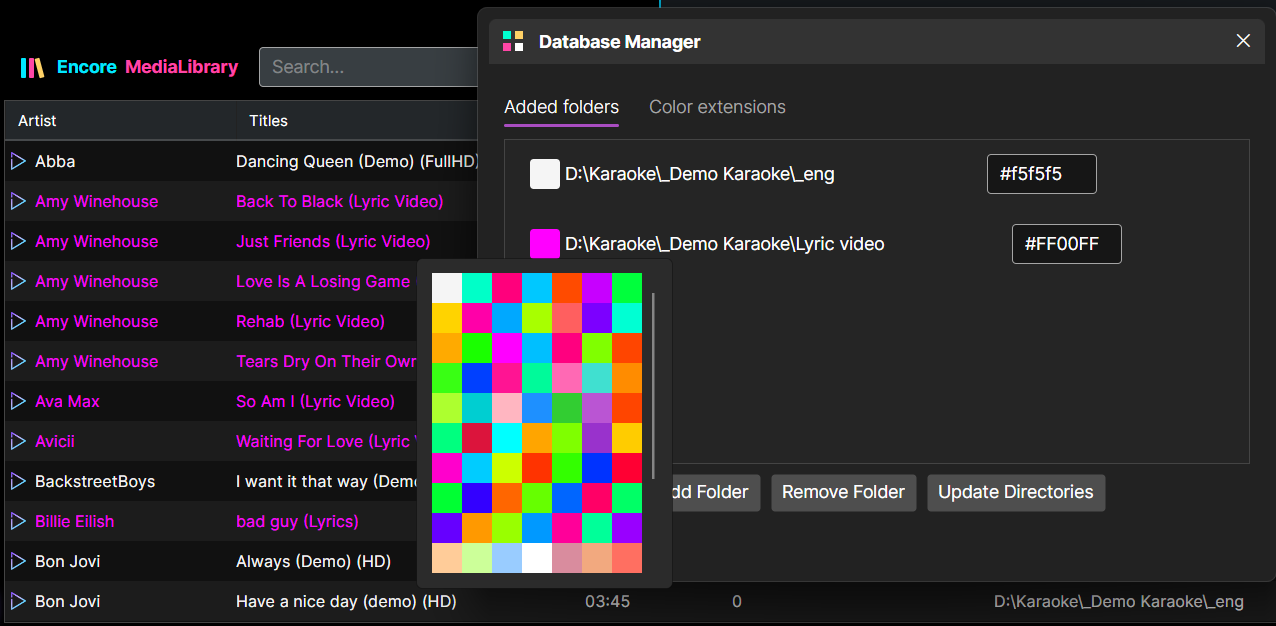
Add, Remove & Refresh with One Click
Managing your library is fast and straightforward. Add a new folder, remove one that’s no longer needed, or trigger a full rescan whenever your collection changes — all from one clean interface.
Key Features
Everything you need to run a flawless karaoke show.
Karaoke Encore 2 was redesigned from the ground up to be the most capable and enjoyable karaoke software available — for professional KJs and casual hosts alike. Here’s what makes it stand out:
🎵 Drag-and-Drop Playlist with Smooth Animations
Reorder songs in your playlist by simply dragging them — with fluid animations that make every move feel natural. The playlist also supports a Singer Name (Requester) column, so you always know who’s up next.
💾 Save & Load Playlists
Save your current playlist under a custom name and reload it at any time. Organize your shows in advance and switch between setlists instantly — all managed through the built-in Library Tree panel.
📺 Encore StreamLink — YouTube & Web Video
Add YouTube or other streaming URLs directly to your playlist. StreamLink integrates web video into your karaoke queue alongside local files — no switching apps, no interruptions.
🎛️ Per-Song Pitch Control
Adjust pitch from -12 to +12 semitones on a per-song basis. Set it before adding a track to the playlist, or change it on the fly during playback — right-click the song and it’s right there.
⏱️ Tempo Adjustment
Speed up or slow down any track without affecting pitch. Perfect for adapting songs to different performers or keeping the energy just right throughout the night.
🗃️ Database Manager with Color Coding
Add unlimited folders to your media library and assign a unique color to each one — from a palette of 90+ colors. Also supports per-extension color coding, so .mp3, .cdg, and .zip files each appear in their own distinct color.
🏷️ Built-in Tag Editor
Edit song metadata — artist, title, album, genre, year, track number, cover image, and more — directly inside Karaoke Encore 2, without any external tools.
📜 Play History
Every song you play is logged with a timestamp. View your full session history, see play counts and last-played dates in the media library, and double-click any history entry to re-queue it instantly.
🖥️ Dual Display & Video Preview
Karaoke Encore 2 automatically detects a second display and routes video output to it. A live preview window in the operator UI always shows exactly what’s playing on screen — no guesswork.
🔇 Silence Removal
Automatically skip silent parts at the beginning and end of tracks, so every song starts and ends cleanly — no awkward pauses on stage.
🎚️ Audio Track Selection
Songs with multiple audio tracks? Switch between them with a single click — choose the vocal guide, backing track, or any available stream for each song.
📁 Wide Format Support
Plays virtually every format you’ll encounter: mp4, mp3, mpg, mpeg, avi, mkv, flv, mov, wmv, wav, flac, vob, ts, m4v, aac, m4a — and full CDG+MP3 support when the files share the same name and folder.
🌍 30 Languages
The entire interface is localized in 30 languages, with automatic detection of your system language on first launch. Switch languages instantly — no restart required.
🍎 Windows & macOS
Fully native on both Windows and macOS — including proper macOS window controls, system language detection, and platform-optimized display handling.
Encore StreamLink
Stream YouTube videos directly into your karaoke queue.
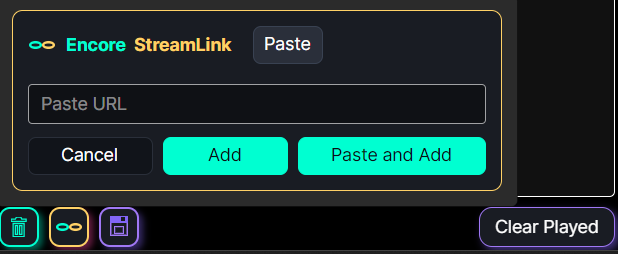
Karaoke Encore 2 goes beyond local files. With Encore StreamLink, you can paste any YouTube URL and it joins your playlist just like a regular song — complete with artist name, title, and playback controls.
No Downloads. No Extra Apps.
Simply click the StreamLink button, paste the URL, and hit Add. The video streams directly through the player — no need to download anything or switch to a browser. Everything stays inside Karaoke Encore 2.
Mix Local Files and Streams Freely
Your playlist can contain any combination of local karaoke files and StreamLink entries. Switch between them seamlessly — the queue handles both the same way, with AutoPlay advancing through them automatically.
Paste & Add in One Click
Already copied a YouTube link? Hit Paste and Add — the URL is pasted and queued in a single action. Perfect for keeping the show moving without interruption.
Available in 30 Languages
Karaoke Encore 2 was built for the world. Whether you’re hosting a karaoke night in Tokyo, Budapest, or São Paulo — the software speaks your language. With full UI localization in 30 languages, every menu, tooltip, and setting feels native, no matter where you are.
Arabic (ar-SA) · Czech (cs-CZ) · Danish (da-DK) · German (de-DE) · Greek (el-GR) · English (en-US) · Spanish (es-ES) · Finnish (fi-FI) · French (fr-FR) · Hindi (hi-IN) · Croatian (hr-HR) · Hungarian (hu-HU) · Indonesian (id-ID) · Italian (it-IT) · Japanese (ja-JP) · Korean (ko-KR) · Norwegian (nb-NO) · Dutch (nl-NL) · Polish (pl-PL) · Portuguese – Brazil (pt-BR) · Portuguese – Portugal (pt-PT) · Romanian (ro-RO) · Russian (ru-RU) · Slovak (sk-SK) · Swedish (sv-SE) · Turkish (tr-TR) · Ukrainian (uk-UA) · Vietnamese (vi-VN) · Chinese Simplified (zh-CN) · Chinese Traditional (zh-TW)
The language switches instantly — no restart needed. Karaoke Encore 2 automatically detects your system language on first launch, so you’re ready to go right out of the box. Join a global community of karaoke enthusiasts and enjoy a software experience tailored to your linguistic preferences.
Experience Karaoke Encore 2 in Your Language:
With support for 30 languages, you can navigate and use every feature in your preferred language — from organizing your library and adjusting settings to performing your favorite songs. Karaoke Encore 2 is here to provide a truly inclusive and accessible karaoke experience for everyone, everywhere.
Minimum Requirements:
- Operating System: Windows 7 or later
- Processor: Dual-core CPU, 2.0 GHz or faster
- Memory: 4 GB RAM
- Graphics: Integrated graphics with DirectX 11 support
- Storage: 2 GB of available hard disk space
- Display: 1280 x 720 resolution
- Internet Connection: Required for license activation and updates
Recommended Requirements:
- Operating System: Windows 10 or later
- Processor: Quad-core CPU, 3.0 GHz or faster
- Memory: 8 GB RAM or more
- Graphics: Dedicated graphics card with 2 GB VRAM, supporting DirectX 12
- Storage: 4 GB of available hard disk space, SSD recommended for faster performance
- Display: 1920 x 1080 resolution or higher
- Internet Connection: Required for license activation, updates, and online features